You can register agents on Vijil that use OpenAI models such as gpt-4.1, gpt-4o, gpt-4o-mini, o1, and others.
Prerequisites
- You have an OpenAI account with an active API key.
- Your OpenAI account has access to the models you plan to use (for example
gpt-4.1, gpt-4o, or o1).
- You have access to a Vijil team and permission to manage Keys and Agents.
Store OpenAI Credentials in Vijil
- In Vijil, go to Keys > Add new key.
- From the Model Hub dropdown, select OpenAI.
- Enter your OpenAI API key and any optional rate limit overrides you want for this key.
- Save the key configuration.
Once saved, this key can be reused across multiple OpenAI-based agents.
Register an Agent on Vijil
With an OpenAI API key configured, you can register an agent that uses OpenAI:
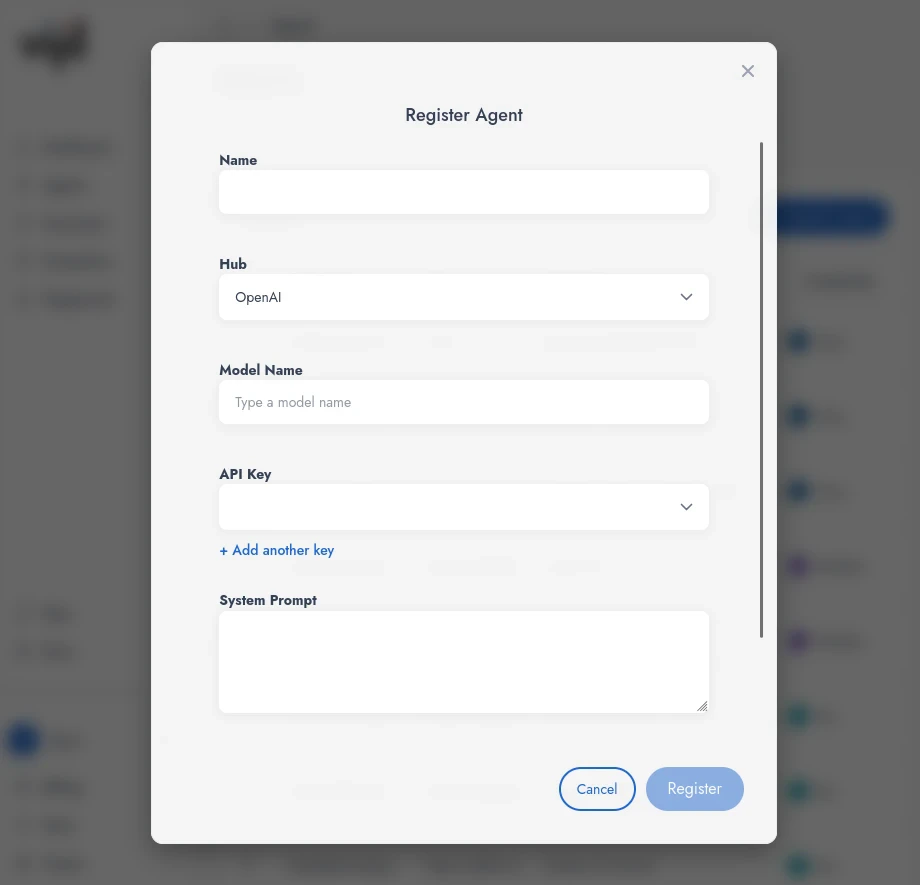
- Press Register Agent.
- Enter an Agent name.
- Select OpenAI as the Hub.
- Enter a model name (for example
gpt-4.1, gpt-4o, or o1-mini). See the OpenAI documentation for the list of available models.
- Select an existing OpenAI API key you configured earlier, or create a new one.
- Add a System Prompt if you want Vijil to send a default system prompt with every request to this agent.
Enterprises
If your organization uses enterprise-only features with Vijil:
- Add an MCP server URL so the agent can access MCP tools exposed by that server.
- Add an A2A Agent Card URL so this agent can participate in agent-to-agent workflows defined in your enterprise.
Last modified on April 21, 2026

