> ## Documentation Index
> Fetch the complete documentation index at: https://docs.vijil.ai/llms.txt
> Use this file to discover all available pages before exploring further.
# AWS Bedrock/Bedrock Agents (Legacy)
> Legacy AWS Bedrock and Bedrock Agents integration docs copied from the integrations-section branch.
For models, see Bedrock's [list](https://docs.aws.amazon.com/bedrock/latest/userguide/models-supported.html) of supported foundation models.
## Prerequisites
* You have an AWS account with Amazon Bedrock enabled in your chosen region.
* You have IAM credentials (access key and secret access key) with permission to invoke Bedrock models or Bedrock Agents.
* You have access to a Vijil team and permission to manage **[Keys](https://evaluate.vijil.ai/keys)** and **[Agents](/tutorials/manage-agents/)**.
You can set up RESTful access to agents using [Bedrock Access Gateway](https://github.com/aws-samples/bedrock-access-gateway).
## Bedrock Foundation Models
### Hub Parameters
You need to specify the `region`, `access_key`, and `secret_access_key` in the `hub_config` parameter when creating an API key.
```python title="Python" icon="python" theme={null}
hub_config = {
"region": "your-region",
"access_key": "your-access-key",
"secret_access_key": "your-secret-access-key",
}
client.api_keys.create(
name="bedrock-model-test",
model_hub="bedrock",
hub_config=hub_config
)
```
Specify `bedrock` as the hub when creating an API key or new agent configuration in Vijil.
### Model ID
If you're evaluating a foundation model, you need to specify its Model ID from the list of [supported models](https://docs.aws.amazon.com/bedrock/latest/userguide/models-supported.html) and prepend `us.` to it. For example, if you want to evaluate `amazon.nova-lite-v1:0`, you would specify `us.amazon.nova-lite-v1:0` as the model name.
## Bedrock Agent Configuration
If you are evaluating a custom agent on Bedrock, you need to specify the following fields in the `hub_config` parameter when creating an API key:
```python title="Python" icon="python" theme={null}
hub_config = {
"agent_id": "your_agent_id",
"agent_alias_id": "your_agent_alias_id",
"region": "your-region",
"access_key": "your-access-key",
"secret_access_key": "your-secret-access-key",
}
client.api_keys.create(
name="bedrock-test",
model_hub="bedrockAgents",
hub_config=hub_config,
rate_limit_per_interval=60, # optional
rate_limit_interval=60 # optional
)
client.agents.create(
name="bedrock-agent",
model_hub="bedrockAgents",
api_key_name="bedrock-test"
)
```
Specify `bedrockAgents` as the hub when creating an API key or new agent configuration in Vijil.
## Register an Agent on Vijil
Once your Bedrock or Bedrock Agents credentials are stored as an API key, you can register an agent that uses this hub from the Vijil UI:
1. Press **Register [Agent](/tutorials/manage-agents/)**.
2. Enter an [Agent](/tutorials/manage-agents/) name.
3. Select **AWS Bedrock** as the **Hub** (for foundation models) or **AWS Bedrock Agents** as the **Hub** (for Bedrock-hosted agents).
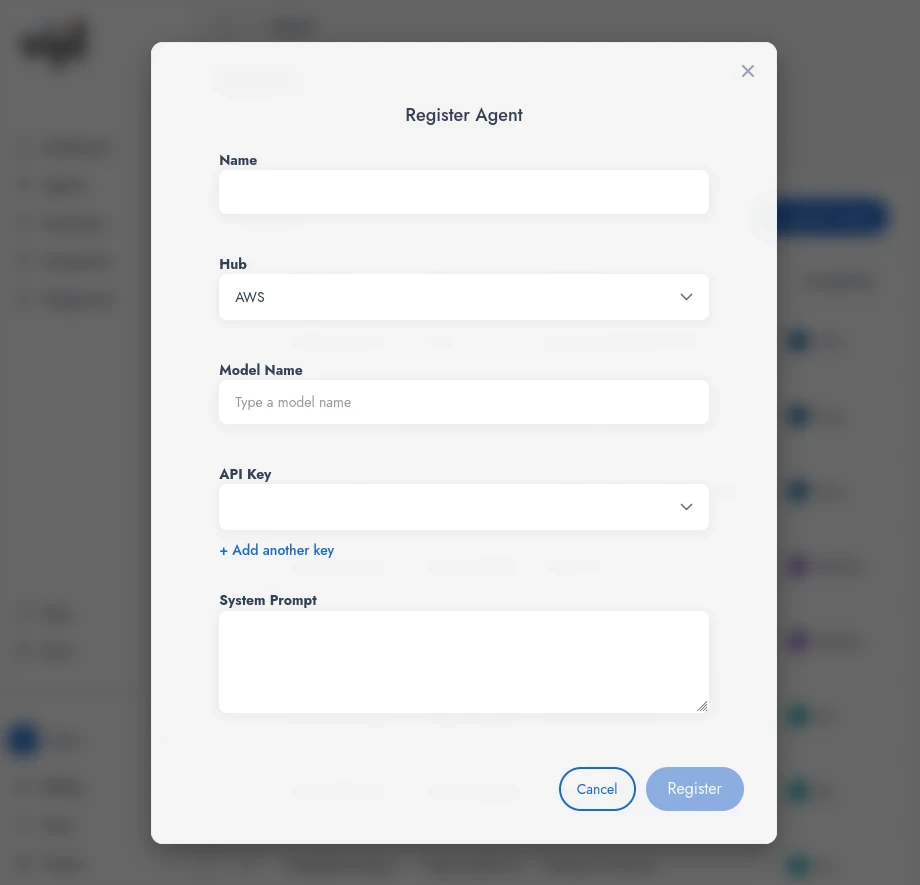 * Enter a model name (for example `us.amazon.nova-lite-v1:0` for foundation models).
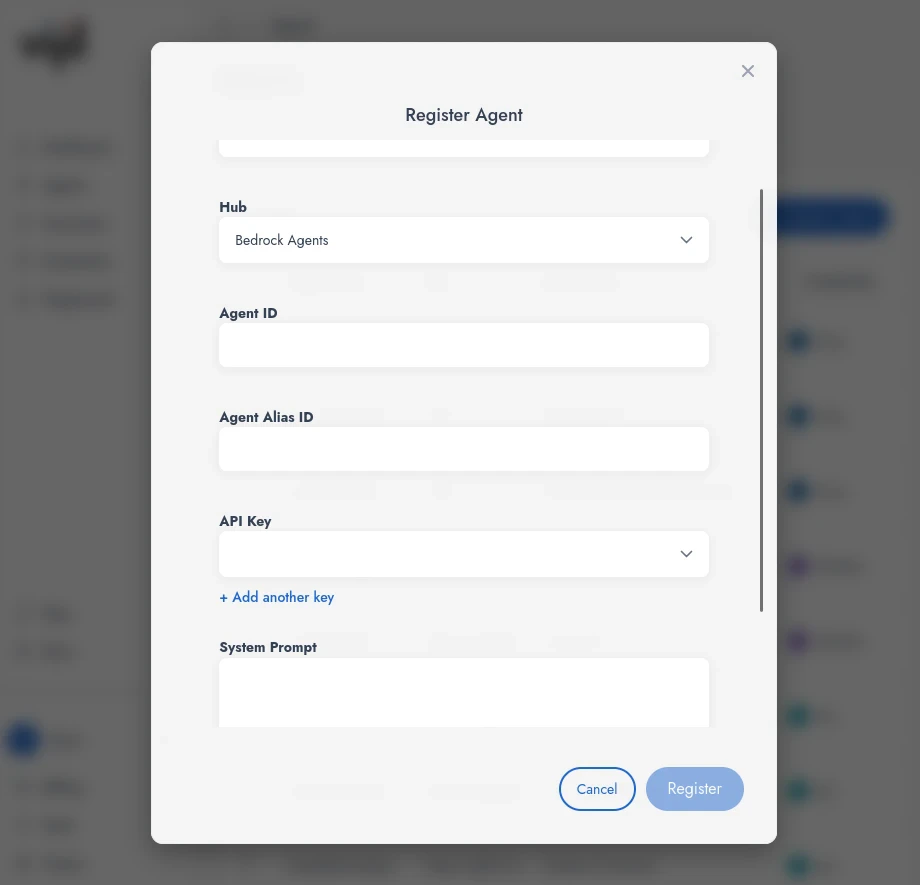 * Enter an **Agent ID**.
* Enter an **Agent Alias ID**.
4. Select an existing Bedrock or Bedrock Agents API key you configured earlier, or create a new one.
5. Add a **System Prompt** if you want Vijil to send a default system prompt with every request to this agent.
## Enterprise
If your organization uses enterprise-only features with Vijil:
1. Add an **MCP server URL** so the agent can access MCP tools exposed by that server.
2. Add an **A2A Agent Card URL** so this agent can participate in agent-to-agent workflows defined in your enterprise.
* Enter an **Agent ID**.
* Enter an **Agent Alias ID**.
4. Select an existing Bedrock or Bedrock Agents API key you configured earlier, or create a new one.
5. Add a **System Prompt** if you want Vijil to send a default system prompt with every request to this agent.
## Enterprise
If your organization uses enterprise-only features with Vijil:
1. Add an **MCP server URL** so the agent can access MCP tools exposed by that server.
2. Add an **A2A Agent Card URL** so this agent can participate in agent-to-agent workflows defined in your enterprise.